
Prepare your team meetings in 2 minutes with Maestro
Escalate critical tasks even before the meeting begins.

Time wasted in sync meetings because information is hidden: how to prepare your team catch-ups in 2 minutes with Maestro by Rosace
Sync meetings are supposed to save time. In theory, they allow a team to quickly realign, share important information, identify blockers, and decide on next actions.
In reality, they often turn into something else: a moment spent searching for information live.
A project manager opens Trello.
A team member mentions that a task might be running late.
Someone asks where the relevant card is.
Another person points out that the information is in a checklist.
We switch boards.
We open several cards.
We scroll.
We check the dates.
We look for the right comment.
We try to understand if the task belongs to the current sprint or to an older phase of the project.
And meanwhile, the meeting goes on... without really moving forward.
The problem isn't that the information doesn't exist. It does. In fact, it's often well-documented. Cards are created, checklists are completed, deadlines are set, and members are assigned. The real problem is that this information is hidden under multiple layers.
This is precisely the type of friction that Rosace aims to resolve: breaking down silos, making information accessible, smoothing exchanges, and accelerating decisions.
Why sync meetings waste so much time
A weekly team meeting should quickly answer a few simple questions:
What has progressed since the last meeting?
Which tasks are overdue?
Which topics are blocked?
Which actions are part of the current sprint?
Which decisions need to be made today?
Who needs to do what before the next meeting?
These questions are simple. Yet, in Trello, the answers are not always immediately visible.
Why?
Because information is often spread across:
multiple boards;
multiple lists;
multiple cards;
multiple checklists;
multiple members;
multiple due dates;
multiple internal statuses.
As a result: instead of using the meeting to make decisions, the team uses it to retrieve data.
And that is where time is lost.
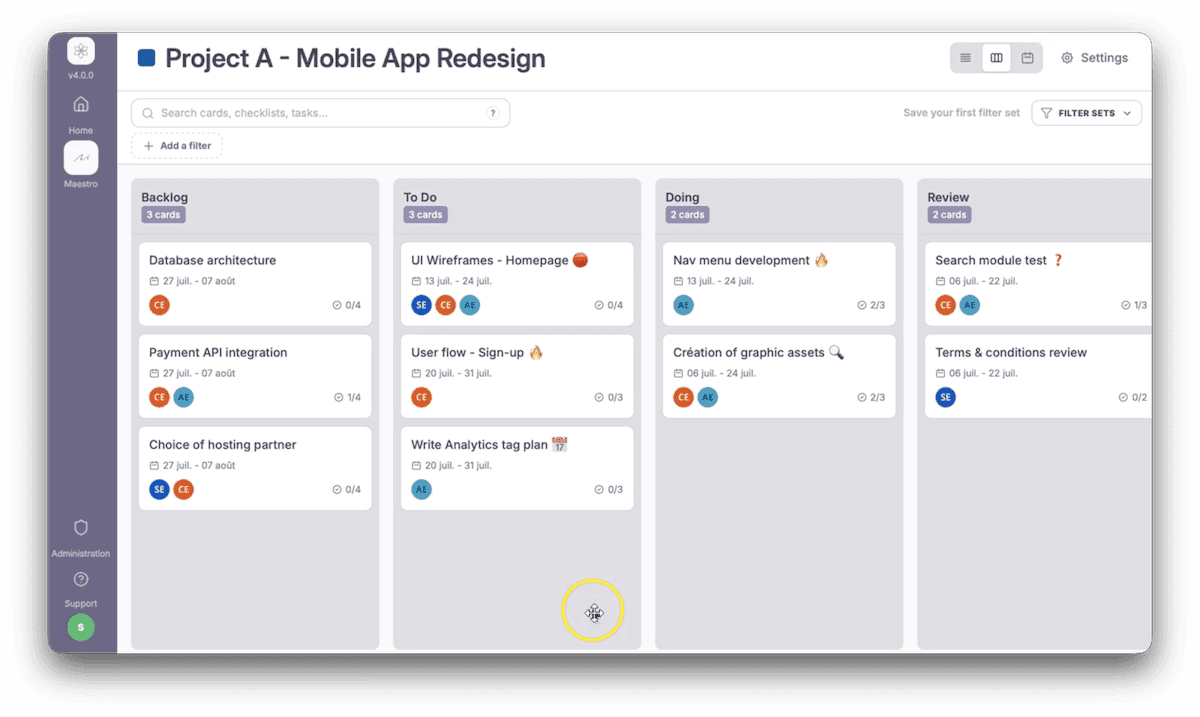
The real problem: the meeting becomes a human search engine
In many teams, the sync meeting looks like this:
"Wait, let me find the card."
"Which board is it on again?"
"I think it's in the checklist."
"Was there a date on it?"
"Is it for this sprint or the next one?"
"Is this task actually late or just not updated?"
These micro-searches seem harmless. But repeated every week, they become a real organizational issue.
They create:
a collective waste of time;
a drop in attention;
a feeling of disorder;
longer meetings;
delayed decisions;
a reliance on the project manager to find information.
The project manager then ends up playing the role of navigator in Trello, instead of playing their true role: coordinating, making calls, and driving topics forward.
What a good meeting should achieve
An effective sync meeting shouldn't be about exploring Trello. It should be about making better decisions faster.
Before the meeting even starts, the project manager should have a clear view of:
overdue tasks;
actions for the current sprint;
blocking issues;
cards requiring a decision;
the team members involved;
the priorities of the week;
points to address in the meeting;
items that can be ignored.
In other words, they shouldn't show up to the meeting with a mountain of information to dig through.
They should show up with a clear list of topics to address.
Three methods to prepare a team meeting directly from the cards
To avoid wasting time in meetings, the goal is simple: surface the right information before the team catch-up.
Here are three concrete methods to use with a Trello + Maestro workflow.
Method 1: instantly isolate the "Current Sprint"
The first mistake in meetings is trying to look at too many things.
A Trello board can contain:
tasks in progress;
tasks planned for later;
completed tasks;
ideas;
pending actions;
blocked items;
out-of-scope topics.
But during a weekly meeting, not everything has the same level of importance.
The project manager must first be able to isolate the actual scope of the meeting: the current sprint.
With Maestro, the idea is to instantly filter cards and sub-tasks related to this specific period, so you don't waste time on items that don't need to be discussed.
In practice, this allows you to see only:
actions planned for this week;
active cards;
tasks linked to the current sprint;
topics that need to progress before the next meeting.
The benefit is immediate: the meeting starts directly on the right scope.
We no longer talk about everything.
We talk about what matters now.
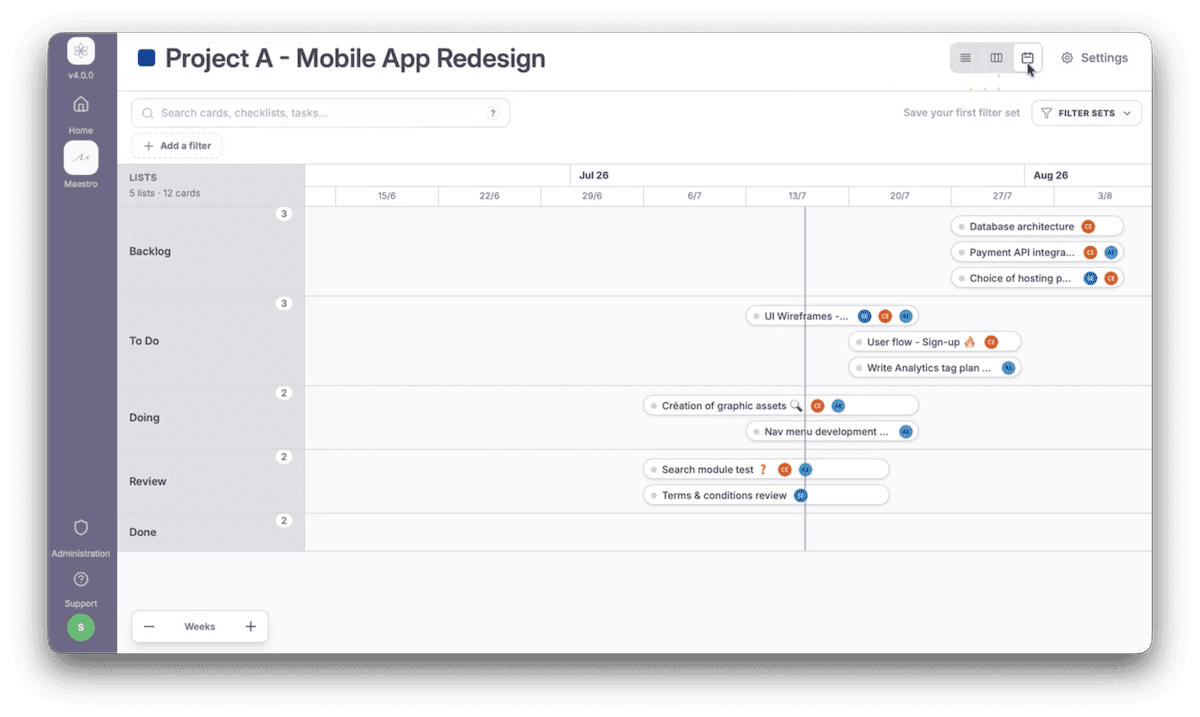
Method 2: surface overdue tasks before the meeting
The second essential topic of a sync meeting is delays.
But here again, the issue is not just knowing that a delay exists. The real challenge is understanding where it lies, who is involved, and what impact it might have.
In Trello, an overdue task can be hidden:
inside a checklist;
in the middle of a card;
on an old board;
in an rarely visited list;
behind a deadline that hasn't been surfaced.
With Maestro's cross-filters, the project manager can prepare their meeting by directly displaying overdue tasks, without having to open each card manually.
This provides a clear view of what requires immediate attention:
which tasks are already overdue;
which cards are impacted;
which members are affected;
which projects are at risk of slipping;
which topics must be prioritized for arbitration.
The meeting then becomes much more effective because problems are visible even before someone flags them.
Method 3: combine filters to create a real meeting agenda
The real time-savings come when you combine multiple criteria.
A task can be:
in the current sprint;
overdue;
assigned to a specific member;
linked to an important client;
marked as blocker;
tied to a critical checklist.
Taken separately, each filter provides useful information.
But combined together, they allow you to create a truly actionable view for the meeting.
For example, a project manager can prepare a view in just a few minutes containing only:
tasks from the current sprint;
that are overdue;
that concern blocking issues;
and that require a collective decision.
This is where Maestro truly shines.
Maestro is not just an extra view. It is the operational orchestration building block of Rosace, designed to structure, coordinate, and give rhythm to project steering.
Instead of leaving the project manager to search for information, Maestro surfaces the relevant elements.
How Maestro transforms meeting preparation
With a traditional setup, preparing a meeting can take 20 to 30 minutes, sometimes more.
You need to:
open the boards;
check the cards;
reread the checklists;
spot the deadlines;
identify delays;
note the topics to discuss;
build the agenda.
With Maestro, the logic changes.
The project manager can prepare their team catch-up using cross-filters capable of instantly displaying useful information.
In practice, this allows you to move from manual preparation to data-driven preparation:
the current sprint is isolated;
delays are visible;
critical cards are surfaced;
priorities are ranked;
the meeting list is built faster;
secondary topics remain in the background.
The meeting no longer starts with a search.
It starts with a decision.
What this changes for the project manager
For a project manager, this is a major shift.
Their role is no longer to dig through Trello live.
Their role goes back to what it should always be:
framing the discussion;
driving decisions forward;
identifying risks;
unblocking issues;
aligning teams;
maintaining the pace of the project.
By preparing the meeting with Maestro, they gain clarity, time, and credibility.
They arrive with a structured vision.
They know which topics need to be addressed.
They know which ones can be set aside.
They can focus the team on the real decision points.
What this changes for the team
The benefit isn't just for the project manager.
For the team, a better-prepared meeting means:
less wasted time;
fewer digressions;
less live searching;
more concrete decisions;
a better understanding of priorities;
greater accountability for everyone.
Each participant quickly understands what applies to them.
Discussions become more precise.
Meetings become shorter but more useful.
Why this approach aligns with the Rosace vision
Rosace is built on a strong conviction: projects should not be managed in silos.
Information must flow.
Stakeholders must be connected.
Decisions must be made faster.
Work must be structured without being rigid.
This is exactly what Maestro enables for team meetings.
It doesn't replace Trello.
It doesn't force teams to completely change the way they work.
It adds an orchestration layer that makes information clearer, more accessible, and more useful for daily management.
This logic is what makes Rosace a work orchestration platform, and not just a suite of isolated tools.
Conclusion: a good meeting doesn't start with a search
Time wasted in meetings doesn't always come from the meeting itself.
It often comes from hidden information.
When important data is scattered across multiple boards, cards, and checklists, teams spend too much time retrieving it and not enough time acting on it.
With Maestro by Rosace's cross-filters, the project manager can prepare their meeting in a few minutes, isolate the current sprint, surface overdue tasks, and build a clear list of topics to address.
The meeting then becomes what it always should have been: a time for alignment, decision-making, and progress.
Because an effective meeting isn't about looking for information together.
It's about acting on information that is already clear.
🎬 YOUR NEXT STEP
1. Discover Maestro in 90 seconds to see how cross-filters help you prepare your team meetings and quickly identify priority tasks, delays, and blockers.
👉 Watch the demo video
2. Try it free for 14 days – no credit card, no commitment.
The question is no longer: "How long does it take to prepare our next meeting?"
The question is: "How much more time are we going to waste in meetings looking for the right information rather than making decisions?"
📌 Do you have questions about Maestro? Check out our Frequently Asked Questions or contact our team.
Time wasted in sync meetings because information is hidden: how to prepare your team catch-ups in 2 minutes with Maestro by Rosace
Sync meetings are supposed to save time. In theory, they allow a team to quickly realign, share important information, identify blockers, and decide on next actions.
In reality, they often turn into something else: a moment spent searching for information live.
A project manager opens Trello.
A team member mentions that a task might be running late.
Someone asks where the relevant card is.
Another person points out that the information is in a checklist.
We switch boards.
We open several cards.
We scroll.
We check the dates.
We look for the right comment.
We try to understand if the task belongs to the current sprint or to an older phase of the project.
And meanwhile, the meeting goes on... without really moving forward.
The problem isn't that the information doesn't exist. It does. In fact, it's often well-documented. Cards are created, checklists are completed, deadlines are set, and members are assigned. The real problem is that this information is hidden under multiple layers.
This is precisely the type of friction that Rosace aims to resolve: breaking down silos, making information accessible, smoothing exchanges, and accelerating decisions.
Why sync meetings waste so much time
A weekly team meeting should quickly answer a few simple questions:
What has progressed since the last meeting?
Which tasks are overdue?
Which topics are blocked?
Which actions are part of the current sprint?
Which decisions need to be made today?
Who needs to do what before the next meeting?
These questions are simple. Yet, in Trello, the answers are not always immediately visible.
Why?
Because information is often spread across:
multiple boards;
multiple lists;
multiple cards;
multiple checklists;
multiple members;
multiple due dates;
multiple internal statuses.
As a result: instead of using the meeting to make decisions, the team uses it to retrieve data.
And that is where time is lost.
The real problem: the meeting becomes a human search engine
In many teams, the sync meeting looks like this:
"Wait, let me find the card."
"Which board is it on again?"
"I think it's in the checklist."
"Was there a date on it?"
"Is it for this sprint or the next one?"
"Is this task actually late or just not updated?"
These micro-searches seem harmless. But repeated every week, they become a real organizational issue.
They create:
a collective waste of time;
a drop in attention;
a feeling of disorder;
longer meetings;
delayed decisions;
a reliance on the project manager to find information.
The project manager then ends up playing the role of navigator in Trello, instead of playing their true role: coordinating, making calls, and driving topics forward.
What a good meeting should achieve
An effective sync meeting shouldn't be about exploring Trello. It should be about making better decisions faster.
Before the meeting even starts, the project manager should have a clear view of:
overdue tasks;
actions for the current sprint;
blocking issues;
cards requiring a decision;
the team members involved;
the priorities of the week;
points to address in the meeting;
items that can be ignored.
In other words, they shouldn't show up to the meeting with a mountain of information to dig through.
They should show up with a clear list of topics to address.
Three methods to prepare a team meeting directly from the cards
To avoid wasting time in meetings, the goal is simple: surface the right information before the team catch-up.
Here are three concrete methods to use with a Trello + Maestro workflow.
Method 1: instantly isolate the "Current Sprint"
The first mistake in meetings is trying to look at too many things.
A Trello board can contain:
tasks in progress;
tasks planned for later;
completed tasks;
ideas;
pending actions;
blocked items;
out-of-scope topics.
But during a weekly meeting, not everything has the same level of importance.
The project manager must first be able to isolate the actual scope of the meeting: the current sprint.
With Maestro, the idea is to instantly filter cards and sub-tasks related to this specific period, so you don't waste time on items that don't need to be discussed.
In practice, this allows you to see only:
actions planned for this week;
active cards;
tasks linked to the current sprint;
topics that need to progress before the next meeting.
The benefit is immediate: the meeting starts directly on the right scope.
We no longer talk about everything.
We talk about what matters now.
Method 2: surface overdue tasks before the meeting
The second essential topic of a sync meeting is delays.
But here again, the issue is not just knowing that a delay exists. The real challenge is understanding where it lies, who is involved, and what impact it might have.
In Trello, an overdue task can be hidden:
inside a checklist;
in the middle of a card;
on an old board;
in an rarely visited list;
behind a deadline that hasn't been surfaced.
With Maestro's cross-filters, the project manager can prepare their meeting by directly displaying overdue tasks, without having to open each card manually.
This provides a clear view of what requires immediate attention:
which tasks are already overdue;
which cards are impacted;
which members are affected;
which projects are at risk of slipping;
which topics must be prioritized for arbitration.
The meeting then becomes much more effective because problems are visible even before someone flags them.
Method 3: combine filters to create a real meeting agenda
The real time-savings come when you combine multiple criteria.
A task can be:
in the current sprint;
overdue;
assigned to a specific member;
linked to an important client;
marked as blocker;
tied to a critical checklist.
Taken separately, each filter provides useful information.
But combined together, they allow you to create a truly actionable view for the meeting.
For example, a project manager can prepare a view in just a few minutes containing only:
tasks from the current sprint;
that are overdue;
that concern blocking issues;
and that require a collective decision.
This is where Maestro truly shines.
Maestro is not just an extra view. It is the operational orchestration building block of Rosace, designed to structure, coordinate, and give rhythm to project steering.
Instead of leaving the project manager to search for information, Maestro surfaces the relevant elements.
How Maestro transforms meeting preparation
With a traditional setup, preparing a meeting can take 20 to 30 minutes, sometimes more.
You need to:
open the boards;
check the cards;
reread the checklists;
spot the deadlines;
identify delays;
note the topics to discuss;
build the agenda.
With Maestro, the logic changes.
The project manager can prepare their team catch-up using cross-filters capable of instantly displaying useful information.
In practice, this allows you to move from manual preparation to data-driven preparation:
the current sprint is isolated;
delays are visible;
critical cards are surfaced;
priorities are ranked;
the meeting list is built faster;
secondary topics remain in the background.
The meeting no longer starts with a search.
It starts with a decision.
What this changes for the project manager
For a project manager, this is a major shift.
Their role is no longer to dig through Trello live.
Their role goes back to what it should always be:
framing the discussion;
driving decisions forward;
identifying risks;
unblocking issues;
aligning teams;
maintaining the pace of the project.
By preparing the meeting with Maestro, they gain clarity, time, and credibility.
They arrive with a structured vision.
They know which topics need to be addressed.
They know which ones can be set aside.
They can focus the team on the real decision points.
What this changes for the team
The benefit isn't just for the project manager.
For the team, a better-prepared meeting means:
less wasted time;
fewer digressions;
less live searching;
more concrete decisions;
a better understanding of priorities;
greater accountability for everyone.
Each participant quickly understands what applies to them.
Discussions become more precise.
Meetings become shorter but more useful.
Why this approach aligns with the Rosace vision
Rosace is built on a strong conviction: projects should not be managed in silos.
Information must flow.
Stakeholders must be connected.
Decisions must be made faster.
Work must be structured without being rigid.
This is exactly what Maestro enables for team meetings.
It doesn't replace Trello.
It doesn't force teams to completely change the way they work.
It adds an orchestration layer that makes information clearer, more accessible, and more useful for daily management.
This logic is what makes Rosace a work orchestration platform, and not just a suite of isolated tools.
Conclusion: a good meeting doesn't start with a search
Time wasted in meetings doesn't always come from the meeting itself.
It often comes from hidden information.
When important data is scattered across multiple boards, cards, and checklists, teams spend too much time retrieving it and not enough time acting on it.
With Maestro by Rosace's cross-filters, the project manager can prepare their meeting in a few minutes, isolate the current sprint, surface overdue tasks, and build a clear list of topics to address.
The meeting then becomes what it always should have been: a time for alignment, decision-making, and progress.
Because an effective meeting isn't about looking for information together.
It's about acting on information that is already clear.
🎬 YOUR NEXT STEP
1. Discover Maestro in 90 seconds to see how cross-filters help you prepare your team meetings and quickly identify priority tasks, delays, and blockers.
👉 Watch the demo video
2. Try it free for 14 days – no credit card, no commitment.
The question is no longer: "How long does it take to prepare our next meeting?"
The question is: "How much more time are we going to waste in meetings looking for the right information rather than making decisions?"
📌 Do you have questions about Maestro? Check out our Frequently Asked Questions or contact our team.
Time wasted in sync meetings because information is hidden: how to prepare your team catch-ups in 2 minutes with Maestro by Rosace
Sync meetings are supposed to save time. In theory, they allow a team to quickly realign, share important information, identify blockers, and decide on next actions.
In reality, they often turn into something else: a moment spent searching for information live.
A project manager opens Trello.
A team member mentions that a task might be running late.
Someone asks where the relevant card is.
Another person points out that the information is in a checklist.
We switch boards.
We open several cards.
We scroll.
We check the dates.
We look for the right comment.
We try to understand if the task belongs to the current sprint or to an older phase of the project.
And meanwhile, the meeting goes on... without really moving forward.
The problem isn't that the information doesn't exist. It does. In fact, it's often well-documented. Cards are created, checklists are completed, deadlines are set, and members are assigned. The real problem is that this information is hidden under multiple layers.
This is precisely the type of friction that Rosace aims to resolve: breaking down silos, making information accessible, smoothing exchanges, and accelerating decisions.
Why sync meetings waste so much time
A weekly team meeting should quickly answer a few simple questions:
What has progressed since the last meeting?
Which tasks are overdue?
Which topics are blocked?
Which actions are part of the current sprint?
Which decisions need to be made today?
Who needs to do what before the next meeting?
These questions are simple. Yet, in Trello, the answers are not always immediately visible.
Why?
Because information is often spread across:
multiple boards;
multiple lists;
multiple cards;
multiple checklists;
multiple members;
multiple due dates;
multiple internal statuses.
As a result: instead of using the meeting to make decisions, the team uses it to retrieve data.
And that is where time is lost.
The real problem: the meeting becomes a human search engine
In many teams, the sync meeting looks like this:
"Wait, let me find the card."
"Which board is it on again?"
"I think it's in the checklist."
"Was there a date on it?"
"Is it for this sprint or the next one?"
"Is this task actually late or just not updated?"
These micro-searches seem harmless. But repeated every week, they become a real organizational issue.
They create:
a collective waste of time;
a drop in attention;
a feeling of disorder;
longer meetings;
delayed decisions;
a reliance on the project manager to find information.
The project manager then ends up playing the role of navigator in Trello, instead of playing their true role: coordinating, making calls, and driving topics forward.
What a good meeting should achieve
An effective sync meeting shouldn't be about exploring Trello. It should be about making better decisions faster.
Before the meeting even starts, the project manager should have a clear view of:
overdue tasks;
actions for the current sprint;
blocking issues;
cards requiring a decision;
the team members involved;
the priorities of the week;
points to address in the meeting;
items that can be ignored.
In other words, they shouldn't show up to the meeting with a mountain of information to dig through.
They should show up with a clear list of topics to address.
Three methods to prepare a team meeting directly from the cards
To avoid wasting time in meetings, the goal is simple: surface the right information before the team catch-up.
Here are three concrete methods to use with a Trello + Maestro workflow.
Method 1: instantly isolate the "Current Sprint"
The first mistake in meetings is trying to look at too many things.
A Trello board can contain:
tasks in progress;
tasks planned for later;
completed tasks;
ideas;
pending actions;
blocked items;
out-of-scope topics.
But during a weekly meeting, not everything has the same level of importance.
The project manager must first be able to isolate the actual scope of the meeting: the current sprint.
With Maestro, the idea is to instantly filter cards and sub-tasks related to this specific period, so you don't waste time on items that don't need to be discussed.
In practice, this allows you to see only:
actions planned for this week;
active cards;
tasks linked to the current sprint;
topics that need to progress before the next meeting.
The benefit is immediate: the meeting starts directly on the right scope.
We no longer talk about everything.
We talk about what matters now.
Method 2: surface overdue tasks before the meeting
The second essential topic of a sync meeting is delays.
But here again, the issue is not just knowing that a delay exists. The real challenge is understanding where it lies, who is involved, and what impact it might have.
In Trello, an overdue task can be hidden:
inside a checklist;
in the middle of a card;
on an old board;
in an rarely visited list;
behind a deadline that hasn't been surfaced.
With Maestro's cross-filters, the project manager can prepare their meeting by directly displaying overdue tasks, without having to open each card manually.
This provides a clear view of what requires immediate attention:
which tasks are already overdue;
which cards are impacted;
which members are affected;
which projects are at risk of slipping;
which topics must be prioritized for arbitration.
The meeting then becomes much more effective because problems are visible even before someone flags them.
Method 3: combine filters to create a real meeting agenda
The real time-savings come when you combine multiple criteria.
A task can be:
in the current sprint;
overdue;
assigned to a specific member;
linked to an important client;
marked as blocker;
tied to a critical checklist.
Taken separately, each filter provides useful information.
But combined together, they allow you to create a truly actionable view for the meeting.
For example, a project manager can prepare a view in just a few minutes containing only:
tasks from the current sprint;
that are overdue;
that concern blocking issues;
and that require a collective decision.
This is where Maestro truly shines.
Maestro is not just an extra view. It is the operational orchestration building block of Rosace, designed to structure, coordinate, and give rhythm to project steering.
Instead of leaving the project manager to search for information, Maestro surfaces the relevant elements.
How Maestro transforms meeting preparation
With a traditional setup, preparing a meeting can take 20 to 30 minutes, sometimes more.
You need to:
open the boards;
check the cards;
reread the checklists;
spot the deadlines;
identify delays;
note the topics to discuss;
build the agenda.
With Maestro, the logic changes.
The project manager can prepare their team catch-up using cross-filters capable of instantly displaying useful information.
In practice, this allows you to move from manual preparation to data-driven preparation:
the current sprint is isolated;
delays are visible;
critical cards are surfaced;
priorities are ranked;
the meeting list is built faster;
secondary topics remain in the background.
The meeting no longer starts with a search.
It starts with a decision.
What this changes for the project manager
For a project manager, this is a major shift.
Their role is no longer to dig through Trello live.
Their role goes back to what it should always be:
framing the discussion;
driving decisions forward;
identifying risks;
unblocking issues;
aligning teams;
maintaining the pace of the project.
By preparing the meeting with Maestro, they gain clarity, time, and credibility.
They arrive with a structured vision.
They know which topics need to be addressed.
They know which ones can be set aside.
They can focus the team on the real decision points.
What this changes for the team
The benefit isn't just for the project manager.
For the team, a better-prepared meeting means:
less wasted time;
fewer digressions;
less live searching;
more concrete decisions;
a better understanding of priorities;
greater accountability for everyone.
Each participant quickly understands what applies to them.
Discussions become more precise.
Meetings become shorter but more useful.
Why this approach aligns with the Rosace vision
Rosace is built on a strong conviction: projects should not be managed in silos.
Information must flow.
Stakeholders must be connected.
Decisions must be made faster.
Work must be structured without being rigid.
This is exactly what Maestro enables for team meetings.
It doesn't replace Trello.
It doesn't force teams to completely change the way they work.
It adds an orchestration layer that makes information clearer, more accessible, and more useful for daily management.
This logic is what makes Rosace a work orchestration platform, and not just a suite of isolated tools.
Conclusion: a good meeting doesn't start with a search
Time wasted in meetings doesn't always come from the meeting itself.
It often comes from hidden information.
When important data is scattered across multiple boards, cards, and checklists, teams spend too much time retrieving it and not enough time acting on it.
With Maestro by Rosace's cross-filters, the project manager can prepare their meeting in a few minutes, isolate the current sprint, surface overdue tasks, and build a clear list of topics to address.
The meeting then becomes what it always should have been: a time for alignment, decision-making, and progress.
Because an effective meeting isn't about looking for information together.
It's about acting on information that is already clear.
🎬 YOUR NEXT STEP
1. Discover Maestro in 90 seconds to see how cross-filters help you prepare your team meetings and quickly identify priority tasks, delays, and blockers.
👉 Watch the demo video
2. Try it free for 14 days – no credit card, no commitment.
The question is no longer: "How long does it take to prepare our next meeting?"
The question is: "How much more time are we going to waste in meetings looking for the right information rather than making decisions?"
📌 Do you have questions about Maestro? Check out our Frequently Asked Questions or contact our team.